3GB means 3GB in total.
The 3GB pass is one bucket for the whole 7 days. It is not 3GB per day, and the bucket does not refill. The 5GB and 10GB passes work the same way over their validity periods.
Japan / data-only eSIM
Four data-only passes for Japan, priced in Australian dollars. Pick the data and days that fit your trip.
Unlimited high-speed means unlimited high-speed data throughout the 7-day validity. Hotspot use is available up to 6GB.
A$9.90 is 3GB total for 7 days. One bucket, not 3GB per day.
01 / What the numbers mean
These are the three things worth knowing before you pick a pass.
The 3GB pass is one bucket for the whole 7 days. It is not 3GB per day, and the bucket does not refill. The 5GB and 10GB passes work the same way over their validity periods.
The 7-day pass includes unlimited high-speed data throughout its validity, with hotspot usage up to 6GB.
All four prices are in Australian dollars and include GST. NZ travellers see the same prices; checkout tax is A$0.
02 / Install
Check for eSIM support, add the pass over Wi-Fi, then label it and test data before you fly. The diagrams are original supporting art; the steps below are the full instructions.
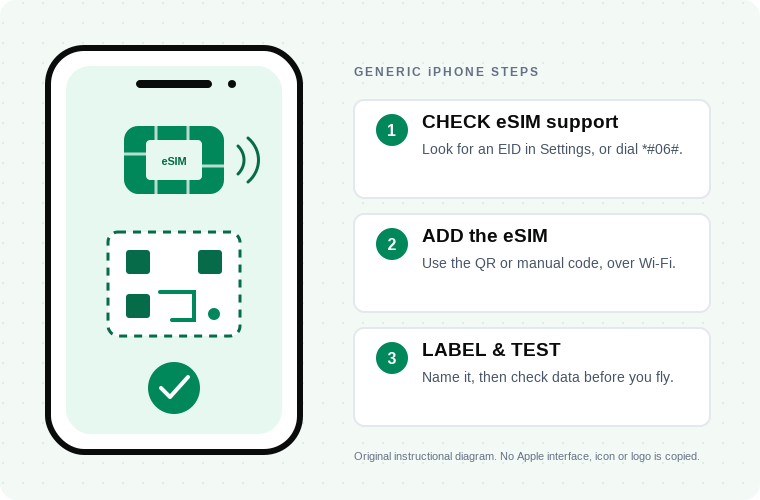
*#06#.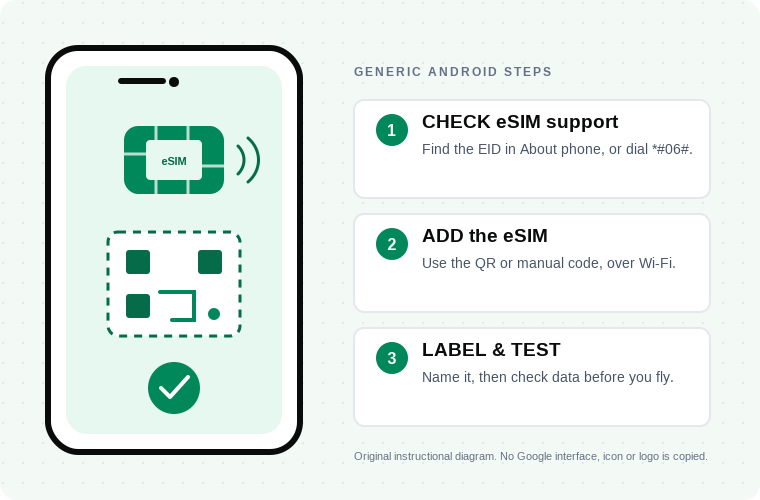
*#06#.Generic phone frames and numbered steps only. No official Settings screens, carrier logos or device-maker trademarks are reproduced.
03 / Before you fly
Your phone needs eSIM support and should be carrier-unlocked. The compatibility guide has general iPhone, Samsung Galaxy and Pixel checks, including the EID test.
Dial *#06#. If an EID line appears, the device supports eSIM. The compatibility page also shows where to look on common phones.
Model lists and EID checks cannot confirm your exact handset, region or carrier lock. Check with your manufacturer or carrier if you are unsure.
Ready to choose?
Data, days and price on one page. The 3GB total rule sits right above the list.